Bing Business Listings Are Acting Up—Here’s What to Know
Bing Business Listings Are Acting Up—Here’s What to Know
Bing might not get the same hype as Google, but it matters more than most folks think—especially now.
With AI-powered search scraping data directly from business listings, having your Bing Places account in good standing isn’t optional. It’s part of your visibility across Microsoft Search, Bing Chat, Copilot, and a ton of online directories that still lean on Bing’s data.
But recently, Bing listings have been weird. After last month’s Google update, we started seeing Bing Places for Business accounts suddenly require re-verification. Businesses that were fully verified and stable for months—or years—got flagged with no warning.
If this happened to you, you’re not alone.
Sync Settings Might Be the Problem
Bing support recommended switching the Google sync setting from weekly or bi-weekly to monthly. Apparently, more frequent syncs can trigger the need for re-verification and during Google updates, things on Google’s side can cause issues on the Bing side. Why that happens is a mystery, but monthly syncs seem to lower the risk.
To change the Sync setting, you’ll want to follow the provided path below:
- Log in to your Bing Places for Business account.
- Select the business you want to update.
- Click on the three dots on the top right-hand corner.

- Click “Notifications Preferences.”
- On the left-hand side, click “Google Business Profile Sync.”
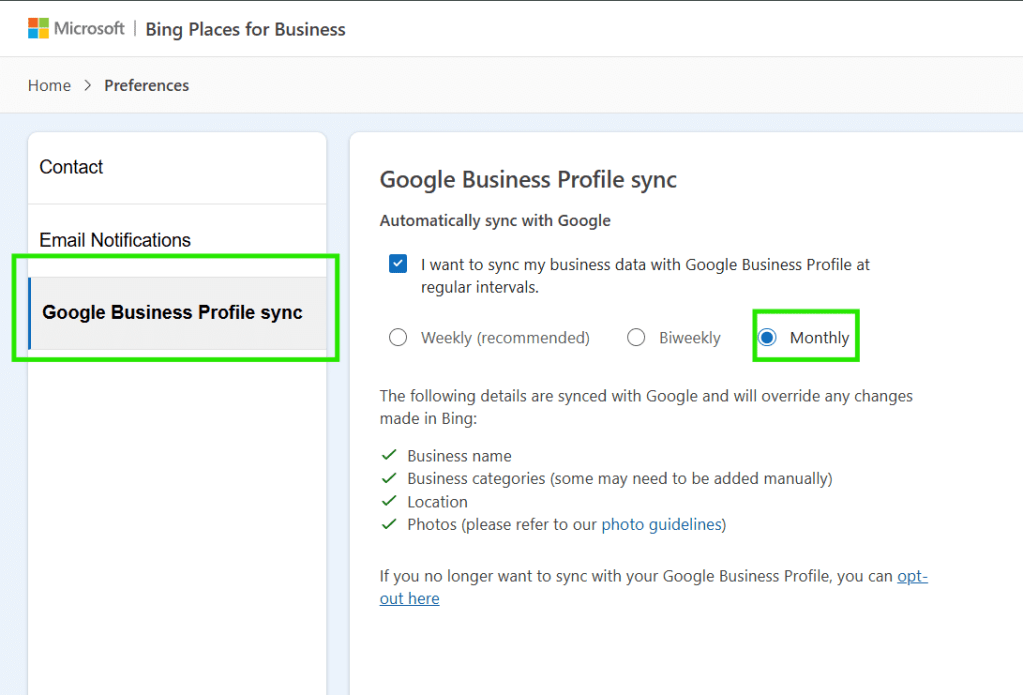
- Click on the “Monthly” option.
Note that there is no option to “Save” changes; Bing will automatically do this for you.
Getting Support Takes Patience (and an Early Alarm)
It took us four days to reach someone who could actually help. What finally worked? Logging into Bing chat support right at 6:00 AM PT, the moment they opened. Any later, and you’re likely staring at a “we’re full” message for the rest of the day.
This Isn’t Just a Glitch—It’s a Signal
Something behind the scenes changed. Whether Bing is scrambling to keep up with Google’s adjustments or cracking down on inconsistencies, it’s causing friction. And that friction can affect how your business shows up—not just in Bing, but anywhere AI pulls local data.
What You Can Do Now
- Log in to Bing Places and check your verification status.
- Update your sync setting to monthly.
- If you’re stuck, aim for support at 6:00 AM sharp.
- Don’t ignore it—Bing is more tied to your visibility than ever.
If you need help sorting through the mess or just want a second set of eyes on your listing, we’ve got you.
Discover more from Be the Page SEO
Subscribe to get the latest posts sent to your email.
Discover more from Be the Page SEO
Subscribe to get the latest posts sent to your email.