Creating GPTs For Your Brand – Don’t Lose Your Voice
Creating GPTs For Your Brand – Don’t Lose Your Voice
Most AI training out there is great at teaching you how to use the tool—how to write a prompt, click a button, and get it to spit out a LinkedIn caption.
What they’re not great at? Teaching you how to make it actually sound like you.
And if your GPT doesn’t reflect your voice, your tone, and your values… what’s the point? You’re just publishing more generic content that could’ve come from anywhere—and anyone.
Building a custom GPT allows the AI tool to incorporate the sound, the tone and voice, of your brand into the content output it delivers. Providing you with something that feels like it came from your desk. Not ChatGPT’s.
Why General AI for Content Doesn’t Work
AI tools are everywhere now. But just because a robot can write doesn’t mean it knows how to speak your language.
The truth? Most AI-generated content feels like it was written in a vacuum. It’s too polished, too vague, and way too far from the truth of who you are. That’s because those tools don’t know your story, your values, or how your people actually talk.
That’s where custom GPTs come in.
When you build a GPT that’s trained on your voice—grounded in your ethos—you’re not handing the mic to a machine. You’re giving it a script that reflects you. Done right, it becomes an extension of your team. One that supports, reflects, and reinforces your brand in everything it writes.
But to do that? You need to get clear on your brand voice.
Start With Your Brand Voice Questionnaire
Before you ever hit “train,” you need the raw materials: how your business sounds, who you’re speaking to, and what you care about.
Here’s a free questionnaire you can use to define your brand voice. You can use this to guide GPT training—or even just get clarity for your team. Most of the questions aren’t about SEO or algorithms. They’re about you.
Want Your Answers Emailed to You?
You can fill out this form to get a copy of your responses sent to your inbox.
It’s free, no strings—just a way to help you stay organized and take your brand voice seriously.
Prefer a Downloadable Version?
Click here to grab the worksheet as a PDF.
If you want help turning this into a fully custom GPT or brand strategy, we’re just an email away.
You can fill this out as a team, or bring it to whoever’s helping you build a custom GPT. If you’re working with a developer, strategist, or writer, this becomes your blueprint.
Remember, it’s not about making a GPT that’s smarter. It’s about making one that’s more you.
These answers can shape:
- Consistency across website content, social media, etc.
- A better understanding of who your brand is.
- How you want your brand presented to the public.
- How do you not want your brand presented to the public?
How to Use This Info to Build Your GPT
Once you’ve filled out the questionnaire, you can plug that information directly into the Custom GPT builder inside ChatGPT (Pro account required). Here’s how:
Step 1: Go to the GPT Builder
Open ChatGPT and click on your name in the bottom left corner.
Choose “Explore GPTs,” then click “Create a GPT.”


Step 2: Follow the Guided Setup
You’ll be taken through a short setup flow. When it asks what you want your GPT to do, you can say something like:
“I want this GPT to write content that reflects my brand voice. It should understand how I talk, who I talk to, and the kind of tone I use for social posts, emails, blogs, etc.”
Step 3: Upload Your Brand Voice Questionnaire
When you reach the part of the builder labeled “Add files”, upload your completed Brand Voice Questionnaire as a PDF, doc, or text file. This becomes part of the GPT’s memory and training material.
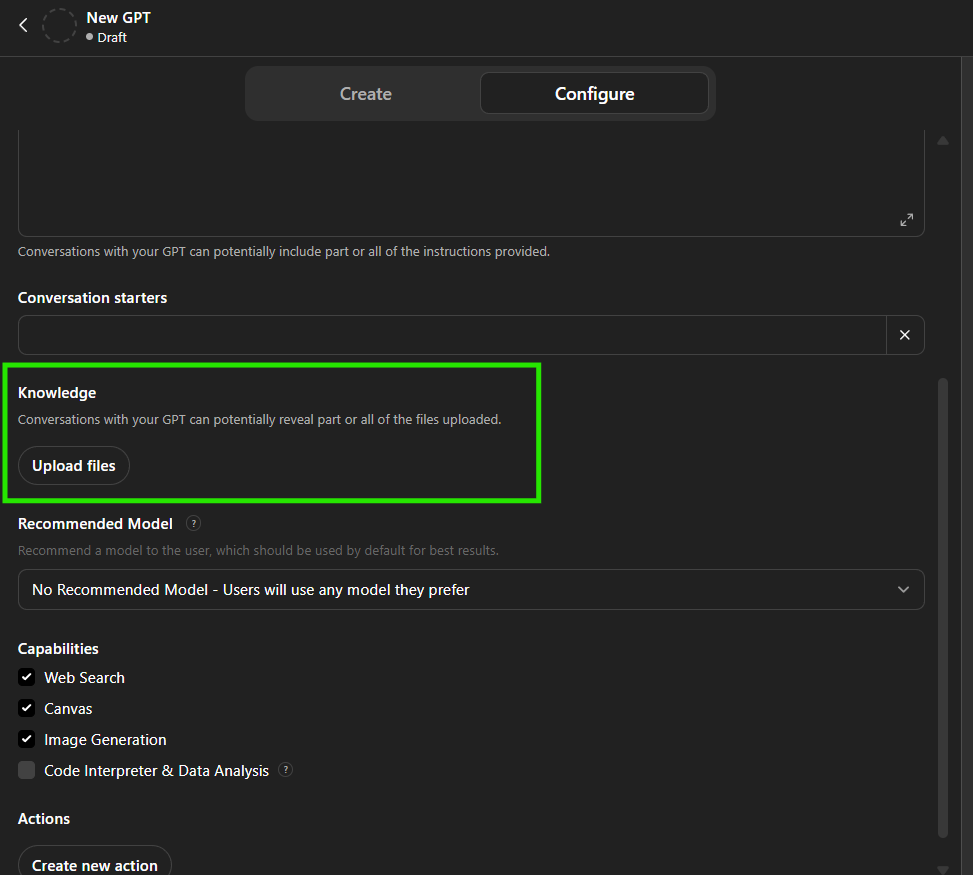
You can also paste the key parts (like your brand adjectives, tone, dos and don’ts) directly into the “Instructions” box if you prefer.
Pro tip: Don’t forget about your brand logo, colors, or even your style guide (if you have one). This will ensure that the creatives generated use brand colors, fonts, etc.
Step 4: Add Example Prompts (Optional but Helpful)
You can give examples like:
- “Write a blog post in my brand voice about how to choose a CRM tool.”
- “Create a friendly Instagram caption promoting a flash sale.”
This helps your GPT learn how to respond in your tone, not just follow general rules.
Step 5: Save and Start Using
Once saved, your custom GPT is ready to use. You can ask it to draft social content, edit existing writing, or brainstorm ideas—all in your voice.
Find Your Voice In the Tools You Use
The more real and specific your brand voice file is, the better your GPT will be. This isn’t about sounding perfect. It’s about sounding like you.
That’s the part most people miss when they rush into AI content—and it’s also the part that builds the most trust with your audience.
Let us know if you want help formatting your brand voice file for upload or turning this into a done-for-you GPT setup. We’re always just a call or click away.
Discover more from Be the Page SEO
Subscribe to get the latest posts sent to your email.
Discover more from Be the Page SEO
Subscribe to get the latest posts sent to your email.